Life Review
Map your chapters. Tag childhood, education, relationships, career phases, geographic moves. See patterns emerge across decades. Your life isn't random—it has a shape you've never seen before.
→ Understand your journey
View your life in weeks.
4KWks helps you visualize the roughly 4,000 weeks the average person lives, reframing your conception of time and bringing a fresh perspective to your life.
Tag different periods of your life with colors and labels, add notes to individual weeks, and emojis to momementous occasions. Gain a new view on where you've been and where you're going.
A glimpse into the simple, powerful interface that brings life perspective to your fingertips.
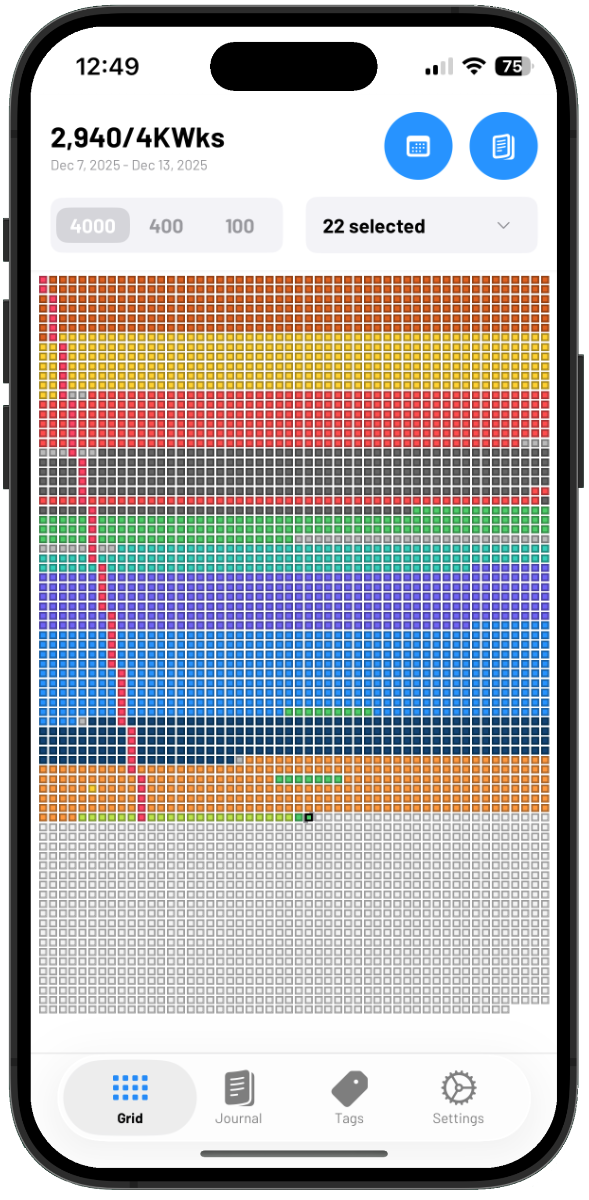
See all 4,000 weeks at once. Each square represents one week of your life.
Add notes to any week to capture memories and reflections.
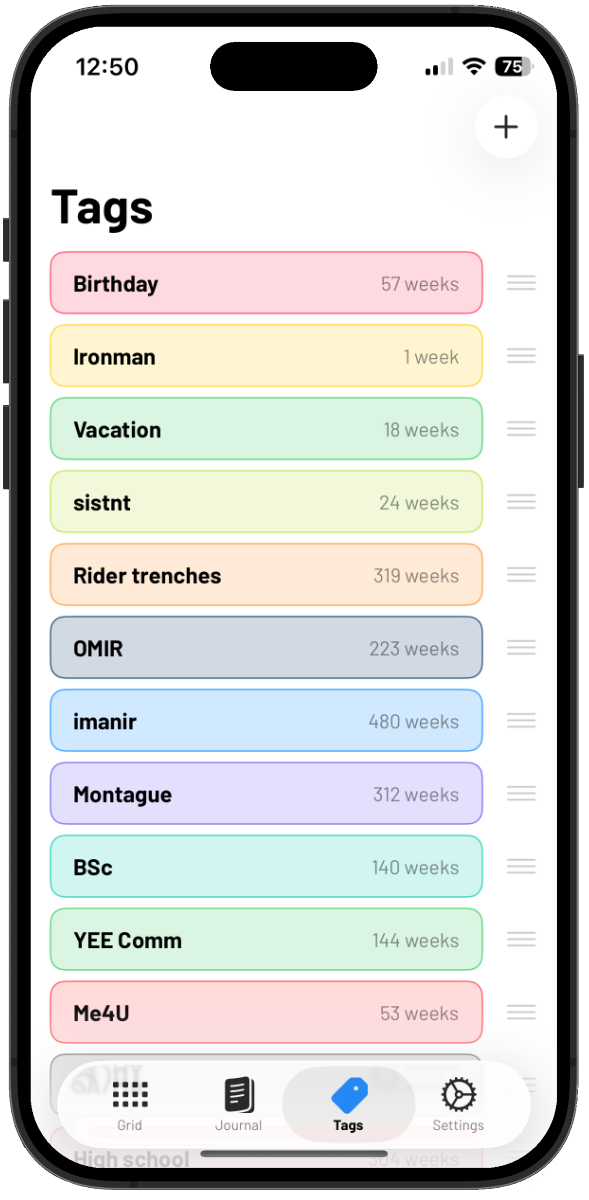
Tag chapters of your life with custom colors and labels.
See your entire life displayed as a grid of weeks. The visual impact of seeing all your weeks at once creates a powerful shift in perspective about how you spend your time.
Create custom tags for different chapters: education, relationships, career phases, locations you've lived, or any meaningful period. Apply them to date ranges or individual weeks.
Add notes to any week to capture what happened, how you felt, or what you learned. Build a personal journal that's organized by the weeks of your life.
Choose from a carefully curated palette of 18 colors organized in warm, cool, and neutral tones. Make your life grid as visually meaningful as it is personally significant.
Your life story stays on your device. No cloud sync, no data collection, no tracking. Your personal timeline is completely private and under your control.
Understanding that you have a finite number of weeks changes how you think about time. 4KWks makes this wisdom visual and actionable, helping you live more intentionally.
Map your chapters. Tag childhood, education, relationships, career phases, geographic moves. See patterns emerge across decades. Your life isn't random—it has a shape you've never seen before.
→ Understand your journeySeeing your remaining weeks changes everything. When time feels finite, priorities clarify. What deserves your next 500 weeks? Your next 50? Use your grid to align time with values.
→ Live with purposeBuild your week-by-week archive. Add notes about memorable events, hard lessons, or how you felt. Create a timeline more personal than any photo album—because you lived every square.
→ Capture your storyYour grid as meditation on mortality. The ancient Stoics practiced "memento mori" to live better lives. 4KWks makes this wisdom tangible through beautiful, simple design that you can see and touch. → Find wisdom in time
Paint your life in color. Different colors for different jobs, relationships, cities, phases. Step back and see the art you've created. Your life has aesthetic structure you've never noticed.
→ Paint your timelineReflection becomes richer when you see the full context. Write about this week while seeing it in the landscape of all your weeks. Weekly notes gain meaning when you understand where you are in the story.
→ Write with perspectiveYour life has patterns waiting to be discovered. How many weeks have you spent learning? Building? Exploring? Future views will reveal the mathematics of your choices—percentages, proportions, the data of a life well-examined.
→ Analyze your time4KWks is built with privacy as a fundamental principle. Your personal life story, your tags, your notes — all of it stays on your device.
No cloud sync means no data collection, no targeted advertising, and no privacy concerns. You own your timeline completely.
Export your data if you want, or keep it private forever. Your choice. Your life.
The average human lifespan is approximately 77 years, which equals roughly 4,000 weeks. This number is both abstract enough to feel distant and concrete enough to be meaningful. It's inspired by the book "Four Thousand Weeks" by Oliver Burkeman.
Go to the Tags tab and tap the '+' button. Give your tag a name (like "College", "Boston", or "Career Phase 1") and choose a color. Then you can apply it to weeks through the tag's calendar view or by selecting date ranges.
Yes! Tap on any week in the grid to open its detail view, then add or edit notes. You can also view all your notes chronologically in the Journal tab.
Use standard pinch-to-zoom gestures on the life grid. You can zoom in to see individual weeks more clearly or zoom out to see your entire life at once. The current week is marked with a special indicator.
Your data stays local on your device for privacy. You can export your data to create your own backups. Future versions may include optional iCloud backup while maintaining privacy.
Yes! Tap the "Edit" button on the Tags screen, then tap any tag to change its name or color. All weeks with that tag will automatically update to reflect the new color.
Future weeks are shown in a muted color in the grid. You can still tag them (for planned life phases) or add notes (for goals and aspirations), but they're visually distinct from weeks you've already lived.
Press and hold a week from in the main Life Grid view. You can drag from the selected week to select a range of weeks. If you don't get the right range, you can click the button labelled "Range" in the multi-week select view to select the starting and end week using the standard date pickers.
Yes! You can export your data including tags, notes, and week assignments from the Settings tab. This allows you to back up your data or move it to another device.
Gain perspective on your time. Tag the chapters of your life. Build your personal timeline.
Download on the App Store